Legal Document Management Software Pricing for Legal Firms
Looking for legal document management software pricing that fits your law firm’s size, workflow, and compliance requirements? Fortva provides AI-powered legal document management and contract lifecycle management software that helps small law firms, mid-sized practices, enterprise legal teams, and professional service organizations securely manage documents, automate workflows, and maintain one source of truth.
As legal teams handle increasing volumes of contracts, client files, case documents, and confidential records, many firms are moving beyond traditional document storage systems and searching for legal document management software that delivers automation, intelligent search, collaboration, security, and contract lifecycle control.
Key Takeaways
- Legal document management software pricing depends on firm size, number of users, storage requirements, workflow complexity, security needs, and required integrations.
- Small law firms need affordable document management solutions that improve organization, client collaboration, and document security without requiring large IT investments.
- Mid-sized and enterprise legal teams require more advanced capabilities, including workflow automation, contract lifecycle management, AI-powered search, compliance controls, and centralized document governance.
- Traditional legal document management platforms such as NetDocuments and Litera have helped many firms organize documents, but some organizations continue searching for alternatives because of concerns around complexity, implementation effort, administration, and total ownership costs.
- Modern legal teams increasingly prefer AI-powered platforms that combine document management, contract lifecycle management, workflow automation, electronic signatures, and document intelligence in a single environment.
- Fortva helps legal teams replace scattered folders, email attachments, manual contract tracking, and disconnected systems with a secure, intelligent platform designed for modern legal operations.
When Legal Document Management Becomes Legal Document Chaos
Imagine this situation. A partner at a growing law firm is preparing for an important client meeting and needs the latest version of a commercial agreement signed six months earlier. The attorney remembers reviewing the contract, but nobody knows whether the final version is stored in the document management system, a shared drive, an email attachment, or a personal folder.
Meanwhile, the legal operations team is preparing a compliance report and discovers that contract renewal dates are being tracked manually across spreadsheets. Several agreements are approaching expiration, but there is no automated reminder system to notify the responsible teams.
At the same time, a client requests access to specific documents related to their matter. The legal team must spend hours searching, verifying permissions, and confirming that the correct files are being shared.
For many law firms, this is not a rare occurrence. It is the result of relying on disconnected tools, outdated filing methods, and document systems that were never designed to manage the complexity of modern legal operations.
Legal documents are not ordinary files. They contain confidential client information, contractual obligations, financial commitments, regulatory requirements, intellectual property, and business-critical decisions. Every document carries context, responsibility, and risk.
When legal teams cannot quickly locate information, identify the correct version, or understand contractual obligations, the consequences extend beyond wasted time. Firms face increased compliance exposure, delayed client service, operational inefficiencies, and unnecessary administrative costs.
The demand for better legal document management solutions continues to grow because law firms recognize that storing documents is no longer enough. Modern legal teams need systems that understand documents, automate repetitive tasks, improve collaboration, and provide visibility throughout the entire document lifecycle.
According to industry research, the global document management system market continues expanding as organizations replace manual processes with cloud-based platforms, artificial intelligence, automation, and improved information governance. Businesses across regulated industries are investing in document management technology because information access, security, and operational efficiency have become competitive advantages.
What Is Legal Document Management Software?
Legal document management software is a specialized platform designed to help law firms and legal departments securely create, store, organize, search, collaborate on, and manage documents throughout their lifecycle.
Unlike traditional folders or general cloud storage solutions, legal document management systems are built around the specific requirements of legal professionals. These systems help manage:
- Client matter documents
- Contracts and agreements
- Legal correspondence
- Court documents
- Compliance records
- Internal policies
- Intellectual property documents
- Transaction files
- Case-related information
A modern legal document management platform provides more than a place to upload files. It creates an organized environment where documents can be controlled, tracked, searched, approved, shared, and analyzed.
For example, when a lawyer searches for a contract, the system should not only locate the file. It should help identify related documents, previous versions, important clauses, approval history, signatures, and associated obligations.
Legal Document Management Software Comparison
| Platform | Pricing | Best For | Why Legal Firms Choose Fortva |
| Fortva | Starting at $299/month (annual plan) | Small, mid and Law firms, legal departments, professional services organizations | Combines documents, contracts, automation, AI extraction, approvals, and collaboration in one secure platform |
| NetDocuments | Custom pricing | Enterprise law firms and corporate legal departments | Provides a modern alternative with integrated document management and contract lifecycle capabilities |
| Litera | Custom pricing | Law firms needing legal productivity and transaction tools | Fortva combines document management, contracts, automation, and collaboration in one platform |
| iManage | Custom pricing | Large law firms and enterprise legal teams | Offers a simpler cloud-based approach with built-in CLM and workflow automation |
| Clio | Starting plans vary by product and region; contact for current pricing | Small and mid-sized law practices | Fortva focuses specifically on intelligent document and contract lifecycle management |
| ContractSafe | Starting at $450/month (Organize plan); $660/month (Finalize); $815/month (Maximize) | Organizations needing contract storage and management | Fortva combines contract lifecycle management with broader document management, workflow automation, and enterprise collaboration |
5 Steps to Streamline Legal Document Management With Fortva
Managing legal documents should not involve searching through folders, chasing email attachments, or manually tracking contract updates. Fortva simplifies the entire document lifecycle by helping legal teams securely store, organize, collaborate on, automate, and manage documents from one centralized platform.
1. Upload and Organize Documents Securely
- Securely upload legal documents to the cloud: Fortva allows legal teams to upload contracts, client files, agreements, policies, and business documents into a secure centralized repository.
- Automatically organize and categorize documents: Instead of relying on inconsistent folder structures, Fortva helps teams classify documents using intelligent organization tools, metadata, and document information, making files easier to locate when needed.
- Create a single source of truth: Store all important legal documents in one controlled environment so attorneys, legal operations teams, and authorized stakeholders always access the latest information.
2. Accelerate Legal Work With AI-Powered Document Intelligence
- Use AI to extract important information from documents: Fortva analyzes documents and helps identify key details such as contract terms, dates, parties, obligations, and critical information without requiring manual review of every file.
- Automate repetitive legal tasks: Legal teams can reduce time-consuming administrative work by automating document processing, reviews, approvals, reminders, and workflow steps.
- Improve accuracy and reduce human error: AI-powered document processing helps minimize mistakes caused by manual data entry while allowing legal professionals to focus on higher-value activities such as negotiation, analysis, and client service.
3. Collaborate Securely With Role-Based Access Controls
- Control who can view, edit, and share documents: Fortva allows organizations to establish role-based permissions so sensitive legal information is only accessible to the appropriate users.
- Enable secure collaboration between teams and clients: Attorneys, clients, finance teams, procurement teams, and external advisors can collaborate on documents without relying on unsecured email attachments.
- Protect confidential legal information: Granular access controls help organizations maintain confidentiality while improving collaboration across departments and stakeholders.
4. Track Changes With Version Control and Audit Trails
- Maintain complete document history: Fortva records document activity, allowing teams to review previous versions, understand changes, and identify who made updates.
- Prevent confusion caused by multiple document versions: Legal teams can avoid working on outdated drafts by maintaining a clear record of the latest approved documents.
- Improve transparency and accountability: Audit trails provide visibility into document activity, supporting compliance requirements and internal governance processes.
5. Automate Contract Workflows From Review to Signature
- Streamline the complete contract lifecycle: Fortva helps legal teams manage contracts from creation and review through approvals, negotiations, signatures, and renewals.
- Automate approval and review processes: Documents can move through predefined workflows, ensuring the right people review and approve agreements at the right time.
- Connect contracts with business operations: With integrations including Microsoft Word, DocuSign, CRM platforms, and automation tools, Fortva helps connect legal documents with the wider business lifecycle.
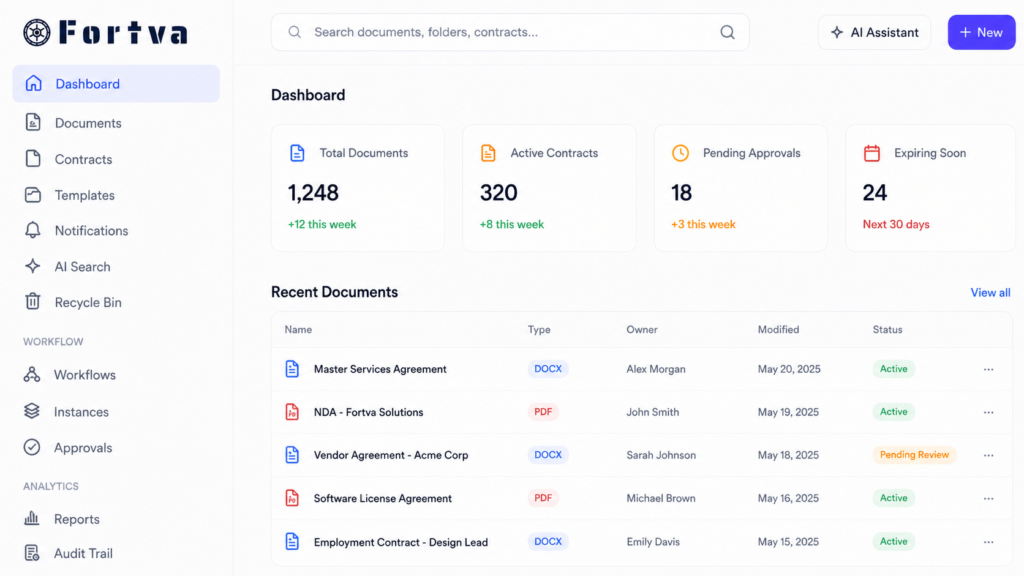
Fortva ROI Compared With Traditional Legal Document Management Systems
When comparing software pricing, organizations should consider the complete cost of ownership.
| Cost Area | Traditional Legal Document Management Systems | Fortva Advantage |
| Software Costs | Often requires separate systems for DMS, CLM, automation, signatures, and reporting | One integrated platform combining DMS, CLM, workflows, and document intelligence |
| Implementation | May require extensive configuration, consulting, and technical resources | Cloud-based platform with in-house onboarding support |
| Training | Complex systems may require significant user training | Intuitive interface designed for faster adoption |
| Administration | Requires ongoing management of workflows, permissions, and configurations | Simplified administration with automation and role-based controls |
| Contract Management | Often requires additional tools to manage contract lifecycle processes | Built-in CLM capabilities from creation through renewal |
| Document Intelligence | Limited extraction and analysis capabilities in many traditional systems | AI-powered extraction and intelligent document processing |
| Workflow Automation | May require additional solutions or customization | Native workflow automation for approvals, reviews, and reminders |
How Much Does Legal Document Management Software Cost?
Legal document management software pricing typically depends on several factors:
- Number of users accessing the system
- Amount of document storage required
- Security and compliance requirements
- Workflow automation needs
- Integration requirements
- Contract lifecycle management capabilities
- Data migration requirements
- Level of customization
Most providers structure pricing through monthly subscriptions, user-based licenses, enterprise agreements, or customized plans. While basic document storage solutions may appear inexpensive, legal teams should consider the total cost of managing documents inefficiently. The real cost of poor document management includes:
- Hours spent searching for files
- Duplicate document creation
- Missed contract deadlines
- Compliance risks
- Administrative overhead
- Delayed client responses
- Inefficient approval processes
Legal Document Management Software Pricing for Small Law Firms
Small law firms often begin their search for document management software because existing tools no longer provide enough control. Many smaller practices rely on:
- Local computer folders
- Email attachments
- External hard drives
- Shared cloud storage
- Manual filing systems
While these methods may work during the early stages of a firm, they create challenges as client matters increase. A small law firm needs a document management system that provides professional-grade security without requiring a dedicated IT department.
Typical Small Law Firm Requirements
Small legal practices usually prioritize:
Secure Document Storage
Client files contain highly confidential information. A professional document management system provides controlled access, encryption, and permission settings to protect sensitive information.
Faster Document Retrieval
Lawyers should be able to locate client agreements, case documents, and correspondence quickly instead of searching through multiple folders.
Client Collaboration
Small firms frequently exchange documents with clients. Secure sharing and electronic signatures help improve the client experience while reducing administrative work.
Affordable Scalability
The platform should support growth without forcing the firm to replace its entire system when additional lawyers or staff members join.
Small Law Firm Pricing Expectations
Small firms typically look for solutions ranging from several hundred dollars per month depending on:
- Number of users
- Features required
- Storage needs
- Automation capabilities
Fortva provides small and growing legal teams with access to enterprise-level document management and contract lifecycle management capabilities without the complexity traditionally associated with large legal technology platforms.
Fortva pricing starts at $343 per month and scales based on organizational volume and requirements. Small firms can access:
- AI-powered document organization
- Secure document sharing
- Electronic signatures
- Workflow automation
- Contract templates
- Version control
- Client collaboration tools

Legal Document Management Software Pricing for Mid-Sized Law Firms
Mid-sized firms experience a major shift in document management requirements. As the number of attorneys, clients, matters, and contracts increases, simple file storage becomes inadequate.
At this stage, firms need systems that support structured workflows, department collaboration, and stronger information governance. A mid-sized firm may manage:
- Thousands of client matters
- Complex commercial agreements
- Regulatory documents
- Litigation records
- Internal policies
- Employee information
Key Requirements for Mid-Sized Legal Teams
Automated Workflows
Mid-sized firms benefit from automated processes that reduce repetitive administrative work. Examples include:
- Document approval routing
- Contract review workflows
- Signature requests
- Client document requests
- Internal notifications
Automation allows lawyers and support teams to focus on higher-value activities instead of manually managing document movement.
Advanced Permissions and Access Control
As firms grow, not every employee should access every document. A modern legal document management platform should allow firms to control access based on:
- Practice area
- Department
- Client matter
- Role
- Permission level
This improves confidentiality and reduces information security risks.
Integration With Existing Business Systems
Mid-sized firms often use multiple technology platforms. A strong document management system should integrate with:
- Microsoft Word
- CRM platforms
- E-signature solutions
- Workflow automation tools
- Business applications
Fortva connects document workflows with platforms such as Microsoft Word, DocuSign, Salesforce, HubSpot, and Zapier to help organizations create connected business processes.
Mid-Sized Law Firm Pricing Expectations
Pricing for mid-sized firms varies depending on:
- Number of users
- Automation requirements
- Integration needs
- Security controls
- Custom workflows
Many traditional enterprise legal document management platforms increase costs significantly as organizations add users and require additional functionality.
Fortva provides a flexible volume-based pricing model designed to support growing organizations. Instead of forcing firms into complicated enterprise deployments, Fortva combines:
- Document management
- Contract lifecycle management
- Workflow automation
- AI extraction
- Secure collaboration
Legal Document Management Software Pricing for Enterprise Law Firms and Corporate Legal Departments
Large law firms and corporate legal departments manage some of the most complex document environments in the world.These organizations may have:
- Multiple offices
- Thousands of employees
- Global clients
- Regulatory obligations
- Large contract portfolios
- Complex approval structures
For these organizations, document management is directly connected to risk management. A missing contract clause, outdated agreement, or unauthorized document access can create significant financial and legal consequences.
Enterprise Legal Document Management Requirements
Enterprise Security and Governance
Large organizations require advanced security controls, including:
- Granular permissions
- Audit trails
- Secure document sharing
- Data protection controls
- Information governance
Fortva provides secure cloud-based document management designed to help organizations maintain control over sensitive information.
AI-Powered Document Intelligence
Enterprise teams cannot manually review thousands of documents. AI-powered systems help extract valuable information from documents, including:
- Contract terms
- Dates
- Obligations
- Parties
- Key clauses
This enables legal teams to transform documents from static files into searchable business intelligence.
Contract Lifecycle Management
Large organizations need visibility throughout the contract lifecycle. This includes:
- Contract requests
- Drafting
- Negotiation
- Redlining
- Approval
- Signature
- Renewal tracking
- Obligation management
Fortva combines CLM functionality with document management, allowing organizations to manage contracts from creation through completion.
The Hidden Costs of Traditional Legal Document Management Systems
| Challenge With Traditional Legal Document Management Software | Hidden Cost Impact on Legal Teams | Fortva Solution |
| Complex Implementation Requirements | Legacy systems often require extensive configuration, technical support, consulting services, and lengthy deployment processes before teams can fully use the platform. | Faster deployment with a modern cloud-based platform. Fortva is designed for easier adoption, allowing legal teams to quickly manage documents, contracts, and workflows without complex implementation projects. |
| Training and User Adoption Challenges | Complicated systems can reduce adoption because lawyers and employees continue using familiar tools like email, shared folders, and personal storage locations. | Simple and intuitive user experience. Fortva helps teams naturally adopt better document practices with easy collaboration, search, workflows, and centralized document management. |
| Need for Multiple Additional Tools | Many platforms require separate solutions for contract management, e-signatures, workflow automation, document intelligence, and reporting, creating disconnected technology environments. | One integrated legal operations platform. Fortva combines document management, CLM, AI-powered extraction, workflow automation, approvals, e-signatures, and reporting in one secure system. |
| Administrative Overhead | Complex legacy systems often require dedicated administrators to manage configurations, permissions, workflows, and ongoing maintenance. | Simplified management and automation. Fortva reduces administrative workload through automated workflows, role-based permissions, and easy system management. |
| Limited Contract Intelligence | Traditional document systems often store contracts but provide limited visibility into obligations, renewal dates, clauses, and important contract information. | AI-powered contract intelligence. Fortva extracts important contract data and helps legal teams identify terms, obligations, and critical information faster. |
| Fragmented Document Workflows | Legal teams often move documents between different platforms, creating delays, version conflicts, and reduced visibility. | Complete document lifecycle management. Fortva connects document creation, review, approval, signature, storage, and renewal processes in one platform. |
| Higher Long-Term Ownership Costs | Additional licenses, integrations, maintenance, consulting, and administration can significantly increase the total cost of traditional systems. | Transparent and scalable pricing. Fortva provides enterprise-grade capabilities with a modern pricing model designed to support growing organizations. |
Key Features to Look For in Legal Document Management Software
Selecting the right legal document management software requires more than comparing storage limits or monthly subscription prices. Legal teams need a platform that understands how legal information moves through an organization, from document creation and review to approval, signature, storage, compliance monitoring, and future retrieval.
The right document management system depends on the size of the firm, the complexity of legal workflows, regulatory requirements, and the number of stakeholders involved. A small law firm may prioritize affordability and secure client collaboration, while an enterprise legal department may require advanced automation, governance, integrations, and AI-powered insights.
Modern legal document management software should provide more than a digital filing cabinet. It should help legal professionals reduce administrative work, improve accuracy, protect confidential information, and make faster decisions.
Below are the most important features law firms and legal departments should evaluate when selecting a legal document management platform.
AI-Powered Document Organization and Intelligent Data Extraction
Legal teams handle thousands of documents containing valuable information, including contracts, agreements, client records, compliance documents, and internal policies.
Traditional document management systems require employees to manually organize files, create folders, add tags, and update metadata. This approach becomes increasingly difficult as document volumes grow.
AI-powered legal document management software changes this process by automatically analyzing documents and extracting important information. A modern platform should be able to identify:
- Document types
- Parties involved
- Contract dates
- Renewal periods
- Important clauses
- Obligations
- Financial terms
- Key legal information
Instead of treating documents as static files, AI transforms them into searchable sources of business intelligence. Fortva uses AI-powered document processing and intelligent OCR technology to extract critical information from documents, helping organizations automate workflows and reduce manual data entry.
Advanced Search and Document Discovery
One of the biggest challenges for legal professionals is finding the right document quickly. Lawyers often need immediate access to:
- Previous agreements
- Client correspondence
- Contract clauses
- Case documents
- Compliance records
- Historical versions
Traditional folder-based systems depend heavily on employees remembering where documents were saved and how they were named.
Advanced legal document management software should provide powerful search capabilities that allow users to locate information using:
- Full-text search
- Metadata filtering
- Document categories
- Keywords
- Extracted contract information
- AI-powered recommendations
For legal teams, faster document discovery directly improves productivity and client responsiveness. Instead of spending valuable time searching through folders and emails, lawyers can focus on analysis, negotiation, and providing legal guidance.
Cloud-Based Secure Document Storage and Access
Modern legal teams operate across different locations, offices, and working environments. Attorneys may work from:
- Law firm offices
- Client locations
- Courts
- Remote environments
- International offices
Cloud-based legal document management software ensures authorized users can securely access information whenever they need it. A secure cloud platform provides:
- Centralized document storage
- Automatic backups
- Controlled access
- Secure sharing
- Remote availability
- Disaster recovery protection
However, accessibility must always be balanced with security. Legal documents contain confidential client information, which means organizations need strict controls over who can view, edit, download, and share documents.
Fortva provides secure cloud-based document management with permission controls and encryption architecture designed to protect sensitive legal information.
Document Version Control and Complete Audit History
Version control is one of the most important capabilities for legal teams. Contracts and legal documents often go through multiple revisions involving lawyers, clients, executives, procurement teams, and external parties. Without proper version management, organizations face problems such as:
- Reviewing outdated agreements
- Sending incorrect documents to clients
- Losing important revisions
- Confusion between draft and final versions
A strong legal document management system should automatically maintain document history and provide visibility into:
- Who edited a document
- When changes occurred
- Previous versions
- Approval history
- Final executed agreements
This creates confidence that legal teams are always working from the correct information. Fortva provides document version control and collaboration tools that help teams manage changes throughout the document lifecycle.
Contract Lifecycle Management (CLM) Capabilities
Legal document management and contract lifecycle management are closely connected. While document management organizes files, CLM manages the complete journey of contracts from creation to completion. A complete legal technology platform should support:
- Contract templates
- Contract requests
- Drafting
- Review workflows
- Negotiation
- Redlining
- Approvals
- Electronic signatures
- Renewal tracking
- Obligation management
Without CLM functionality, legal teams often rely on spreadsheets and manual reminders to monitor important contract events. This creates unnecessary risk. For example, a company may have hundreds of supplier agreements but no simple way to identify:
- Which contracts renew next month
- Which agreements contain unfavorable clauses
- Which vendors have outstanding obligations
- Which contracts require legal review
Fortva combines document management with contract lifecycle management, allowing organizations to manage agreements from initial request through renewal.
Workflow Automation for Legal Operations
Legal teams spend significant time performing repetitive administrative tasks. These tasks include:
- Sending documents for approval
- Requesting signatures
- Following up on reviews
- Tracking contract status
- Notifying stakeholders
- Managing deadlines
Workflow automation eliminates many manual processes by creating structured, repeatable workflows.
- Examples of legal workflow automation include:
- A sales agreement automatically routes from sales to legal review.
- A supplier contract automatically moves through procurement approval.
- A completed agreement automatically triggers signature requests.
- A renewal date automatically creates a reminder for the responsible team.
- Automation improves consistency while reducing delays.
Fortva helps organizations automate document and contract workflows so legal teams can spend less time managing processes manually.
Electronic Signature Integration
Electronic signatures have become an essential part of modern legal operations. Manually printing, signing, scanning, and emailing documents creates unnecessary delays.
Legal document management software should integrate with trusted electronic signature platforms to simplify execution.
Fortva integrates with DocuSign, allowing teams to securely send documents for signatures while maintaining document history and control. This creates a smoother process from contract approval to final execution.
Secure Collaboration With Clients and External Stakeholders
Legal work often requires collaboration beyond internal teams. Law firms regularly exchange documents with:
- Clients
- Opposing counsel
- Advisors
- Vendors
- Business partners
Email attachments create security risks and make it difficult to control document access. A modern legal document management platform should provide secure collaboration features, including:
- Controlled document sharing
- Permission-based access
- Client portals
- Secure uploads
- Activity tracking
Fortva enables legal teams to securely share documents with clients and external stakeholders while maintaining control over sensitive information.
Security, Compliance, and Access Controls
Security is one of the most important considerations when selecting legal document management software. Legal organizations manage highly confidential information, including:
- Client records
- Litigation materials
- Contracts
- Financial information
- Intellectual property
A reliable platform should provide:
- Role-based permissions
- Access controls
- Audit logs
- Encryption
- Secure authentication
- Document governance
Security is not only about preventing unauthorized access. It is also about creating accountability and maintaining compliance.
Fortva provides enterprise document security features designed to help organizations protect sensitive information while maintaining efficient collaboration.
Integration
Legal documents rarely exist in isolation. Contracts and legal files connect with many other business processes, including sales, procurement, finance, HR, and customer management.
The best legal document management software integrates with existing technology ecosystems. Important integrations include:
- Microsoft Word
- CRM platforms
- E-signature tools
- Automation platforms
- Business applications
Fortva connects with tools such as Microsoft Word, DocuSign, Salesforce, HubSpot, and Zapier to help organizations connect documents with broader business workflows.
Reporting, Analytics, and Contract Intelligence
As contract volumes increase, legal leaders need visibility into document activity and contractual obligations. Advanced reporting capabilities help organizations understand:
- Contract status
- Upcoming renewals
- Approval delays
- Document activity
- Compliance risks
- Operational performance
Instead of manually collecting information from spreadsheets and emails, legal teams can access accurate insights from one centralized platform.
Fortva vs NetDocuments vs Litera vs iManage vs Clio vs ContractSafe: Which Legal Document Management Software Is Right for Your Firm?
When law firms evaluate legal document management software, they are rarely looking for just another place to store files. They are looking for a platform that improves how legal information is created, reviewed, approved, protected, shared, and managed throughout its lifecycle.
For many years, traditional legal document management platforms have helped law firms organize large volumes of information. Solutions such as NetDocuments and iManage became widely adopted among enterprise legal organizations because they provide robust document storage, security controls, and matter-based organization.
However, as legal technology requirements have evolved, many firms are now looking for more modern alternatives that combine document management, contract lifecycle management, workflow automation, artificial intelligence, and collaboration capabilities in one platform. The question many legal teams ask today is:
Do we need another document repository, or do we need an intelligent legal operations platform?
This distinction is becoming increasingly important as firms deal with growing contract volumes, remote collaboration, cybersecurity concerns, and increasing pressure to improve efficiency.
NetDocuments Alternative | Switch to Fortva
NetDocuments is one of the most recognized legal document management platforms in the market. It is widely used by law firms and legal departments that require enterprise document management, security controls, and legal-focused workflows. NetDocuments provides capabilities including:
- Document storage
- Matter-centric organization
- Collaboration tools
- Security controls
- Compliance features
- Integration with legal technology systems
For large legal organizations with established technology teams and complex requirements, NetDocuments can provide a strong foundation for document management.
However, as legal teams evaluate alternatives, some organizations look for platforms that provide greater simplicity, faster deployment, and more integrated workflow capabilities. Common challenges organizations evaluate when considering NetDocuments alternatives include:
- Higher total ownership costs
- Complex implementation processes
- Administrative requirements
- Difficulty customizing workflows
- Need for additional tools to support broader contract lifecycle management needs
Many firms today want more than document storage. They want a platform that actively helps manage contracts, approvals, obligations, signatures, and business processes.
Fortva’s Advantage
Fortva is designed as an AI-powered document management and contract lifecycle management platform that combines capabilities that many organizations traditionally manage across multiple systems. Fortva provides:
- Document management
- Contract lifecycle management
- AI-powered extraction
- Workflow automation
- Contract templates
- Redlining and version control
- Electronic signatures
- Secure client sharing
- CRM integrations
Instead of managing documents in one system and contracts in another, Fortva provides a connected environment for the complete document lifecycle.
Litera Alternative | Switch to Fortva
Litera is a major provider of legal technology solutions focused on document productivity, transaction management, collaboration, and legal workflow tools.
Litera has built a broad ecosystem of solutions designed to support lawyers throughout different stages of legal work. Its technology portfolio includes capabilities around:
- Document comparison
- Drafting assistance
- Transaction management
- Legal collaboration
- Document workflow improvement
For firms that require specialized legal productivity tools, Litera provides valuable capabilities. However, some organizations evaluating Litera alternatives are looking for a more unified platform rather than managing multiple solutions for different parts of the legal workflow. Common considerations when evaluating Litera include:
- Multiple products across the ecosystem
- Complexity managing different solutions
- Need for additional systems for document management and CLM
- Workflow fragmentation between tools
Fortva’s Advantage
Fortva brings together document management, contract lifecycle management, and workflow automation in one platform.Legal teams can manage:
- Contract requests
- Drafting
- Reviews
- Approvals
- Negotiations
- Signatures
- Storage
- Renewals
iManage Alternative | Switch to Fortva
iManage is another leading legal document management platform used by many enterprise law firms. iManage provides strong capabilities for:
- Document management
- Knowledge management
- Collaboration
- Security
- Governance
Large organizations often choose iManage because of its enterprise capabilities and long history within the legal technology market. However, firms evaluating modern alternatives often consider factors such as:
- Deployment complexity
- Administrative requirements
- Cost management
- Ability to combine DMS and CLM capabilities
Clio Alternative | Switch to Fortva
Clio is a popular legal practice management platform used by many small and mid-sized law firms. Clio helps firms manage:
- Client intake
- Matters
- Billing
- Calendars
- Practice operations
For law firms looking for broader practice management functionality, Clio provides valuable tools. However, document-intensive legal operations often require deeper document management and contract lifecycle capabilities. Fortva focuses specifically on helping organizations manage:
- Legal documents
- Contracts
- Workflows
- Approvals
- Secure collaboration
- Document intelligence
ContractSafe Alternative | Switch to Fortva
ContractSafe focuses primarily on contract organization and contract storage. It helps organizations:
- Store contracts
- Search agreements
- Track important dates
- Manage contract information
For organizations needing basic contract repository functionality, ContractSafe can provide useful capabilities. However, organizations requiring advanced workflow automation, AI-powered document processing, and broader document management capabilities may need a more comprehensive platform. Fortva combines:
- Document management
- Contract lifecycle management
- Workflow automation
- AI extraction
- Secure collaboration
Why Legal teams Chooses Fortva
Fortva was built around the reality that documents and contracts are connected business processes. A contract is not just a PDF stored in a folder. It represents:
- A relationship
- A financial commitment
- A legal obligation
- A business decision
- A compliance responsibility
Fortva helps organizations manage the complete lifecycle by combining:
- AI-powered document management
- Contract lifecycle management
- Workflow automation
- Secure document sharing
- E-signature capabilities
- Document intelligence
- Advanced permissions
- Enterprise security
Migrate to Dedicated CLM, Fortva
Move away from drowning in scattered contracts and disconnected documents. Stop digging through folders, searching email threads, or chasing contract updates across different systems.
Fortva keeps every contract, document, term, revision, approval, and obligation organized in one secure platform.
Legal teams, finance departments, procurement teams, sales teams, HR departments, accountants, and advisors can work from one trusted source of truth.
Start your free trial today or book a demo with Fortva to see how modern legal document management and contract lifecycle management can transform your organization.
Frequently Asked Questions
How much does legal document management software cost?
Legal document management software pricing depends on factors such as users, storage requirements, automation needs, integrations, and security requirements. Small firms may pay a few hundred dollars monthly, while enterprise organizations typically require customized pricing. Fortva pricing starts at $343 per month and scales based on organizational requirements.
What is the best document management software for law firms?
The best legal document management software depends on the firm’s size, workflow requirements, and business objectives. Modern firms increasingly prefer platforms that combine document management, AI capabilities, workflow automation, and contract lifecycle management.
Is NetDocuments worth the price?
NetDocuments is a well-established legal document management platform used by many organizations. However, firms evaluating alternatives often compare factors such as pricing, complexity, implementation requirements, and the availability of integrated contract lifecycle management capabilities.
What are the best NetDocuments alternatives?
Organizations searching for NetDocuments alternatives often evaluate platforms based on usability, automation, security, integrations, and total cost of ownership. Fortva provides a modern alternative by combining document management and CLM capabilities in one platform.
Does Fortva offer contract lifecycle management?
Yes. Fortva provides contract lifecycle management capabilities including templates, workflows, approvals, redlining, electronic signatures, document storage, and renewal tracking.
Can legal document management software improve compliance?
Yes. A modern legal document management system improves compliance through access controls, audit trails, document governance, version tracking, and centralized information management.