Hyland Alternative vs M-Files Alternative vs Laserfiche Alternative vs Fortva
Are you looking for a Hyland, M-Files, or Laserfiche alternative enterprise content management software? Which one truly delivers on performance, automation, and cost. Fortva is the best choice, easy to use, affordable with transparent pricing, deep integrations with Microsoft and DocuSign, unlimited storage and users, seamless onboarding, and enterprise-grade support that actually scales with your business.
Key Takeaways
- Fortva leads in usability and onboarding, eliminating the steep learning curve often associated with traditional enterprise content management (ECM) platforms.
- Transparent and scalable pricing makes Fortva far more predictable compared to Hyland, M-Files, and Laserfiche, which typically require custom quotes.
- Advanced automation powered by AI, OCR, and metadata extraction enables Fortva to outperform competitors in workflow efficiency and document intelligence.
- Unlimited users and storage remove growth barriers, unlike competitors that charge per user or storage tier.
- Deep integrations (Microsoft, Salesforce, HubSpot, DocuSign, Zapier) position Fortva as a modern, connected ecosystem—not a siloed document repository.
- Enterprise-grade security with zero-knowledge encryption ensures compliance and peace of mind across industries like healthcare, finance, and legal.
- Fortva combines document management + contract lifecycle management (CLM) into one platform—something competitors often split into multiple tools.
What Is Enterprise Content Management (ECM) Software?
Enterprise content management software—also known as a document management system (DMS) or record management system—is designed to capture, store, manage, and automate business documents and workflows. It plays a critical role in digital transformation by replacing paper-based processes with intelligent, automated systems.
Modern ECM platforms go beyond simple storage. They incorporate optical character recognition (OCR), machine learning, metadata tagging, and workflow automation to streamline operations such as accounts payable, contract approvals, and compliance tracking.
According to a 2024 report by IDC, organizations that implement intelligent document management systems reduce document processing costs by up to 40% and improve workflow efficiency by over 60%—a compelling reason why businesses are actively searching for better alternatives to legacy systems.
Hyland vs M-Files vs Laserfiche vs Fortva Comparison Table
| Feature / Capability | Hyland (OnBase) | M-Files | Laserfiche | Fortva (Best Choice) |
| Ease of Use | Complex, requires training and IT support | Moderate, but confusing metadata structure | Outdated UI, learning curve | Extremely intuitive, fast onboarding |
| Deployment | On-premise, cloud, hybrid | Cloud & on-premise | Cloud & on-premise | 100% cloud-native (fast, scalable) |
| Pricing Model | Custom pricing (expensive, unclear) | Custom pricing (scales with users) | Custom pricing (hidden costs) | Transparent, affordable, scales as you grow |
| Storage Limits | Limited based on plan | Limited based on plan | Limited tiers | Unlimited storage |
| User Limits | Per-user pricing | Per-user pricing | Per-user pricing | Unlimited users (no extra cost) |
| Document Management (DMS) | Strong enterprise capabilities | Strong metadata-driven system | Strong but traditional | Advanced + easy-to-use document management |
| Contract Lifecycle Management (CLM) | Requires add-ons | Limited CLM | Limited CLM | Built-in full CLM (end-to-end) |
| Workflow Automation | Powerful but complex to configure | AI-driven workflows | Strong but rigid | AI-powered, easy drag-and-drop automation |
| OCR (Optical Character Recognition) | Advanced | Advanced | Advanced | AI-powered OCR + intelligent data extraction |
| Metadata Management | Strong | Core strength | Moderate | Flexible (metadata + folders combined) |
| Document Version Control | Available | Strong | Available | Advanced versioning + redlining |
| Search & Retrieval | Good but depends on setup | Excellent (metadata-based) | Good | Lightning-fast AI + metadata search |
| Integrations | ERP-focused integrations | Microsoft-focused | Limited modern integrations | Microsoft, DocuSign, Salesforce, HubSpot, Zapier + custom APIs |
| E-signatures | Limited / integrations needed | Integrations required | Integrations required | Native + DocuSign integration |
| Security & Compliance | Enterprise-grade | Enterprise-grade | Enterprise-grade | Zero-knowledge encryption + enterprise compliance |
| Implementation Time | Months | Weeks to months | Months | Days to weeks (rapid deployment) |
| Customer Support | Enterprise-level but slow | Mixed reviews | Mixed reviews | Fast, dedicated onboarding & support |
| Best For | Large regulated enterprises | Metadata-driven organizations | Government & compliance-heavy orgs | All businesses (SMBs to enterprise) needing speed, scale & simplicity |
Hyland (OnBase) vs Fortva
Hyland, known for its OnBase platform, is a long-standing leader in enterprise content management, particularly in highly regulated industries such as healthcare and government.

Hyland offers a robust file management system with strong capabilities in document imaging software, workflow automation, and compliance management. It is widely used for healthcare document management and large-scale enterprise deployments.
Key Features
Hyland excels in document capture and imaging, using advanced OCR technology to digitize and organize large volumes of records. Its workflow engine enables automation across departments, particularly in finance and procurement. The platform also integrates with ERP systems, making it suitable for enterprises with complex IT environments.

Limitations
Despite its power, Hyland comes with significant drawbacks. The system is often criticized for being overly complex, requiring extensive training and IT involvement. Implementation can take months, and customization often demands specialized consultants. Additionally, pricing is opaque and tends to scale aggressively with users and storage.
Why Fortva Is Better
Fortva delivers the same enterprise-grade functionality without the complexity. Unlike Hyland, Fortva offers an intuitive interface that allows teams to get started quickly without heavy IT dependency. Its AI-powered document capture software, combined with intelligent OCR and metadata extraction, ensures faster processing with minimal manual intervention.
Moreover, Fortva’s zero-knowledge encryption and built-in CLM capabilities provide a unified platform for both document and contract lifecycle management—something Hyland typically requires additional modules to achieve.
M-Files vs Fortva
M-Files differentiates itself through its metadata-driven architecture, focusing on organizing documents based on what they are rather than where they are stored.
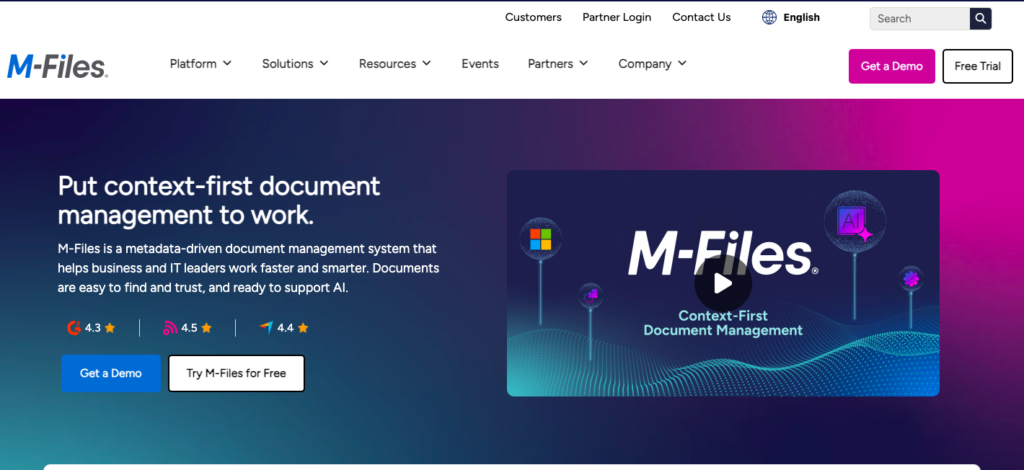
M-Files is a modern software document management solution that uses metadata and AI to improve document retrieval and workflow automation.
Key Features
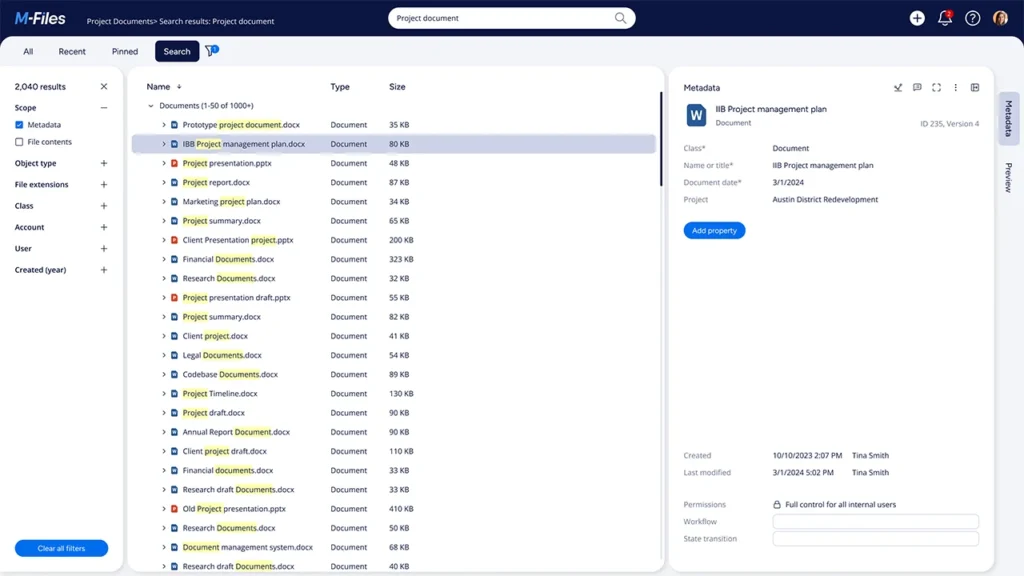
The platform’s strength lies in its metadata-based organization, allowing users to find documents quickly without navigating complex folder structures. It also integrates machine learning to automate classification and improve search accuracy. M-Files supports compliance with audit trails and version control, making it suitable for regulated industries.
Limitations
While innovative, M-Files can be difficult for new users to understand due to its non-traditional structure. Businesses accustomed to folder-based systems often face a steep learning curve. Additionally, pricing is not transparent, and scaling can become expensive as organizations grow.
Why Fortva Is Better
Fortva combines the best of both worlds—traditional folder structures and advanced metadata tagging—giving users flexibility without confusion. Its document version control, redlining, and contract review workflows are built natively into the platform, making it ideal for legal, procurement, and finance teams.
Unlike M-Files, Fortva offers unlimited users, enabling organizations to scale without worrying about per-seat costs. Its seamless integrations with Microsoft Word, Salesforce, and HubSpot also ensure that documents are connected directly to the customer lifecycle.
Laserfiche vs Fortva
Laserfiche is another major player in the ECM space, known for its focus on automation and compliance.

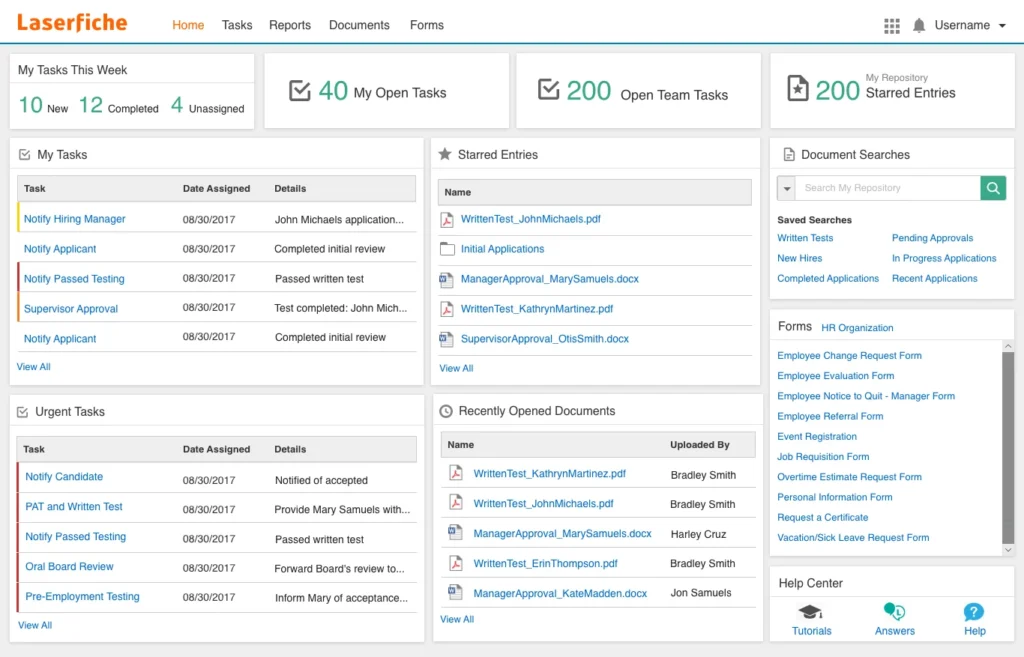
Laserfiche provides a comprehensive document management software solution with strong capabilities in workflow automation, records management, and document capture.
Key Features
Laserfiche excels in document imaging software and optical character recognition programs, enabling organizations to digitize paper-based processes efficiently. Its workflow engine allows for automation of repetitive tasks such as invoice processing and approvals. The platform also includes robust compliance tools and audit trails.
Limitations
Despite its strengths, Laserfiche is often criticized for its outdated interface and complex setup. Customization requires technical expertise, and onboarding can be time-consuming. Like its competitors, Laserfiche relies on custom pricing, which can make budgeting difficult.
Why Fortva Is Better
Fortva takes automation to the next level with AI-driven workflows that not only automate tasks but also extract insights from documents. Its document capture software and intelligent OCR reduce manual data entry significantly, while its workflow automation ensures faster approvals and decision-making.
In addition, Fortva’s cloud-native architecture ensures faster deployment, better scalability, and lower maintenance costs compared to Laserfiche’s more traditional setup.
Fortva: The Modern Standard for Document and Contract Management
Fortva is not just another document management system—it is a next-generation enterprise content management platform designed for modern businesses.It is teh modern solution for modern busineses records management. 
Unified Document and Contract Lifecycle Management
Unlike competitors that separate DMS and CLM, Fortva combines both into a single platform. This allows businesses to manage everything from document creation to contract execution and renewal without switching tools.
AI-Powered Automation and Insights
Fortva leverages machine learning and OCR to extract critical data from documents, automate workflows, and deliver actionable insights. This is particularly valuable for accounts payable paperless software, procurement, and legal operations.
Seamless Integrations
Fortva integrates with Microsoft Word, DocuSign, Salesforce, HubSpot, and Zapier, ensuring that documents flow seamlessly across your business ecosystem.
Enterprise Security
With military-grade zero-knowledge encryption, Fortva ensures that your data remains secure and compliant with global standards such as GDPR and HIPAA.
Transparent Pricing and Scalability
One of Fortva’s biggest advantages is its transparent pricing model. Businesses can scale without worrying about hidden fees or escalating costs.
Use Cases Across Industries
Fortva is designed to support a wide range of industries, from healthcare and finance to legal and manufacturing.
In healthcare, it streamlines healthcare document management by securely storing patient records and automating compliance workflows. In finance, it transforms accounts payable processes through automated invoice capture and approval workflows. Legal teams benefit from advanced contract lifecycle management, including version control, redlining, and e-signatures.
According to a 2025 Gartner study, organizations that adopt integrated DMS and CLM platforms experience a 25% faster contract cycle time and a 30% reduction in compliance risks—a clear indication of the value Fortva delivers.
Finally
Which ECM Software Should You Choose? I guess you are at a cross road. Hyland, M-Files, and Laserfiche are all powerful enterprise content management platforms, but they share common challenges: complexity, high costs, and slow implementation.
Fortva, on the other hand, is built for the modern enterprise. It combines ease of use, powerful automation, and transparent pricing into a single platform that scales effortlessly with your business.
If your goal is to accelerate digital transformation, improve workflow efficiency, and reduce operational costs, Fortva is the clear winner.
Get S E T, G O
Are you ready to let technology work for you? About 76% of participants in a survey by Deloitte identified a current need to implement new technology. Now is the time for you to do the same and invest in a smart document management software(DMS).
Whether you are starting at the beginning, middle, or later in your DMS and CLM journey, Fortva has the experts and technology to help.
Lets Do This — Start your journey with Fortva today with FREE trial Or, Book a demo to see for yourself.
Frequently Asked Questions
What is enterprise content management software (ECM)?
Enterprise content management software (ECM) is a system that helps businesses capture, store, organize, and automate documents and records across the organization. It includes capabilities like document management, workflow automation, metadata tagging, optical character recognition (OCR), and compliance tracking. Modern ECM platforms also integrate with CRM, ERP, and contract lifecycle management tools to support full digital transformation.
What is the difference between a document management system (DMS) and ECM?
A document management system (DMS) focuses primarily on storing, organizing, and retrieving documents, including features like document version control and file sharing. ECM is broader—it includes DMS capabilities but also adds workflow automation, records management, compliance, and advanced analytics. Platforms like Fortva combine both DMS and ECM into a unified solution.
Why are businesses looking for alternatives to Hyland, M-Files, and Laserfiche?
Many businesses are moving away from traditional platforms like Hyland, M-Files, and Laserfiche due to high costs, complex implementation, and steep learning curves. These systems often require heavy IT involvement and long onboarding times. Companies today prefer modern, cloud-based solutions that are easier to use, faster to deploy, and offer transparent pricing—like Fortva.
What makes Fortva a better alternative to Hyland, M-Files, and Laserfiche?
Fortva stands out because it combines ease of use, powerful automation, and transparent pricing in one platform. Unlike competitors, Fortva offers unlimited users and storage, built-in contract lifecycle management (CLM), AI-powered document capture software, and seamless integrations with tools like Microsoft Word, Salesforce, HubSpot, and DocuSign. It is designed for fast onboarding and immediate ROI.
Does Fortva support contract lifecycle management (CLM)?
Yes. Fortva includes full contract lifecycle management (CLM) capabilities. You can create, edit, review, approve, and store contracts in one place. Features like redlining, version control, e-signatures, and automated approval workflows make it ideal for legal, procurement, and finance teams.
How does OCR (optical character recognition) improve document management?
OCR technology converts scanned documents and images into searchable and editable text. In modern systems like Fortva, AI-powered OCR goes further by extracting key data automatically, reducing manual data entry and improving accuracy. This is especially useful for accounts payable paperless software, invoice processing, and document indexing.
What is metadata in document management systems?
Metadata is data that describes other data. In a document management system, metadata includes information like document type, author, date, and keywords. It helps users quickly search and retrieve documents. While platforms like M-Files rely heavily on metadata, Fortva combines metadata and folder-based organization for maximum flexibility and ease of use.
Is cloud-based document management software better than on-premise?
Yes, for most businesses. Cloud-based systems offer faster deployment, lower upfront costs, automatic updates, and better scalability. They also support remote work and real-time collaboration. Fortva is fully cloud-native, making it easier to implement and maintain compared to traditional on-premise systems.
What industries benefit most from document management software?
Many industries benefit from ECM and DMS solutions, including:
- Healthcare (patient records and compliance)
- Finance and accounting (invoice automation and audits)
- Legal (contract management and document version control)
- Manufacturing (process documentation and compliance)
- Procurement and sales (workflow automation and approvals)
Fortva is designed to support all these industries with tailored workflows and automation.
How secure is Fortva compared to other ECM platforms?
Fortva offers enterprise-grade security with zero-knowledge encryption, ensuring that only authorized users can access sensitive data. It also supports compliance with regulations such as GDPR and HIPAA. This level of security is comparable to, and often more advanced than, traditional platforms like Hyland, M-Files, and Laserfiche.
How long does it take to implement Fortva?
Unlike traditional ECM systems that can take months to deploy, Fortva can be implemented in days to weeks. Its intuitive interface and guided onboarding process make it easy for teams to get started quickly without heavy IT involvement.
Can Fortva integrate with existing business tools?
Yes. Fortva integrates seamlessly with popular tools such as Microsoft Word, Salesforce, HubSpot, DocuSign, and Zapier. These integrations allow you to connect your document management system directly to your existing workflows and customer lifecycle processes.
What is document version control and why is it important?
Document version control tracks changes made to a document over time, allowing users to access previous versions and maintain an audit trail. This is critical for compliance, collaboration, and accuracy. Fortva offers advanced version control with redlining and approval workflows, making it ideal for contract and document management.
Is Fortva suitable for small businesses or only enterprises?
Fortva is designed for both. Its scalable pricing, unlimited users, and ease of use make it ideal for small and mid-sized businesses, while its advanced automation and security features meet enterprise requirements.
What should I look for when choosing document management software?
When evaluating a document management system, consider:
- Ease of use and onboarding
- Automation capabilities (workflow, OCR, AI)
- Integration with existing tools
- Pricing transparency
- Security and compliance
- Scalability (users and storage)
Fortva checks all these boxes, making it one of the most complete and future-ready solutions on the market.