The Benefits of Traceability or Audit Trail Software for Compliance and Data Security
Every action on a document leaves a digital footprint—and audit trail software turns those footprints into powerful, court-ready evidence that protects your business.
From compliance to cybersecurity, a robust document audit trail doesn’t just track activity—it builds trust, accountability, and operational clarity across your entire organization.
Key Takeaways
- A well-implemented audit trail system transforms document management from passive storage into an active compliance and security engine. Businesses gain full visibility into who accessed, edited, approved, or shared documents at any moment, making it easier to meet regulatory requirements and prevent internal or external risks.
- Traceability software also strengthens governance by ensuring every document interaction is recorded, time-stamped, and tamper-proof, while automation reduces manual errors and audit preparation time. With platforms like Fortva, audit trails become actionable intelligence—helping teams streamline workflows, enforce accountability, and confidently pass audits without disruption.
What’s a Document Audit Trail?
A document audit trail is a chronological, tamper-evident record of every interaction that occurs within a document or system. It captures detailed logs such as who accessed a file, what changes were made, when those changes occurred, and how the document moved through workflows.
Unlike basic file activity logs, modern audit trail software—like what Fortva provides—creates a secure, immutable record that can be exported as a comprehensive audit trail report for compliance, legal defense, or internal governance.
This level of traceability is no longer optional. In industries like legal, finance, healthcare, procurement, and consulting, audit trails are foundational to proving accountability and ensuring data integrity.

What Are Audit Trails, and Why Do They Matter?
Audit trails matter because businesses today operate in a high-risk, highly regulated environment where data breaches, compliance failures, and disputes can be costly. According to IBM’s Cost of a Data Breach Report, the average global data breach cost reached over $4.4 million, highlighting the need for strong data governance mechanisms.
Audit trails provide that mechanism by offering transparency into every document lifecycle event. They allow organizations to answer critical questions instantly:
- Who accessed this contract?
- Who approved this policy?
- What changes were made—and when?
Key Benefits of Implementing Audit Trails
1. Strengthened Compliance Across Industries
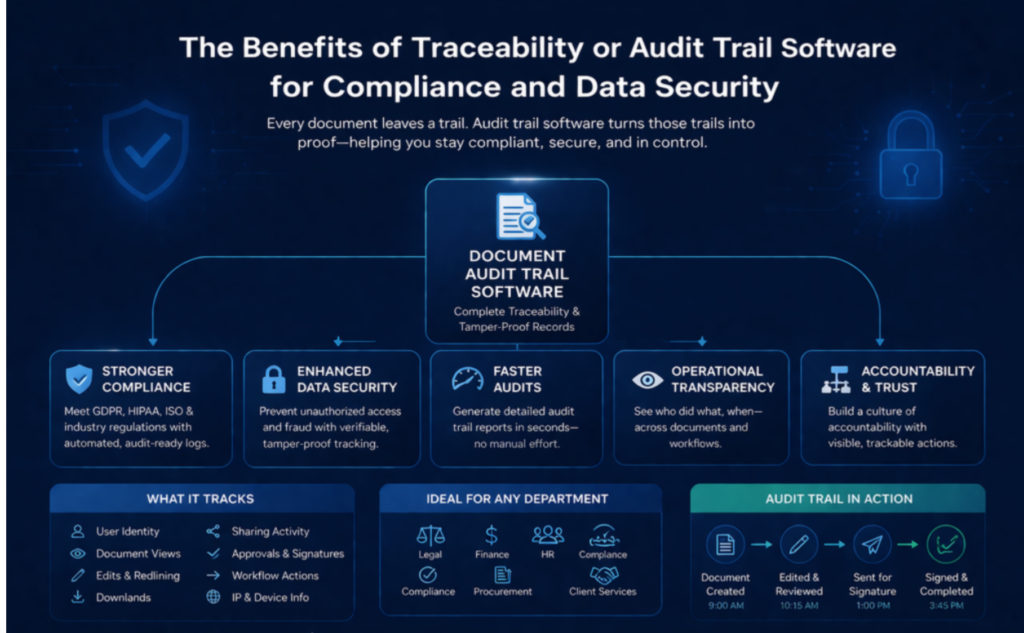
Regulatory frameworks such as GDPR, HIPAA, and ISO standards require organizations to maintain clear records of data access and processing. Audit trail software ensures compliance by automatically documenting all document interactions in real time.
For consulting firms, legal teams, and financial advisors, this means being able to produce audit-ready reports instantly—without scrambling during compliance checks.
2. Enhanced Data Security and Fraud Prevention
Audit trails act as a deterrent against unauthorized access and internal misuse. When users know their actions are being tracked, accountability increases, and risky behavior decreases.
Fortva’s zero-knowledge encryption, combined with detailed audit logs, ensures that even sensitive enterprise documents remain secure while maintaining full traceability.
3. Faster and More Efficient Audits
Manual audits are time-consuming and prone to human error. With automated audit trail reporting, businesses can generate detailed logs in seconds.
This reduces audit preparation time significantly while improving accuracy, making internal and external audits smoother and less disruptive.
4. Improved Operational Transparency
Audit trails provide visibility across departments and workflows. Whether it’s tracking contract approvals or monitoring document access across teams, businesses gain a clear picture of how work is being done. This transparency helps identify inefficiencies, bottlenecks, and opportunities for process improvement.
How to Use Audit Trail to Track Changes in Legal Documents
Legal documents require precise tracking due to their binding nature. Audit trail software enables legal teams to monitor every edit, comment, approval, and signature throughout the document lifecycle.
For example, during contract negotiations, Fortva tracks redlining changes, version updates, and approvals in real time. This ensures that no unauthorized edits go unnoticed and that all stakeholders are aligned on the final version. This level of traceability is especially critical during disputes, where a complete audit trail can serve as legal evidence.
How Audit Trail Documentation Differs from Version History
Many businesses mistakenly believe version history is sufficient for compliance, but it only tells part of the story. Version history shows document changes over time, while audit trails provide a full record of all interactions—including views, downloads, shares, and approvals.
Comparison Table: Audit Trail vs Version History
| Feature | Audit Trail Software | Version History |
| Tracks document views | Yes | No |
| Tracks downloads and sharing | Yes | No |
| Records user identity | Yes | Limited |
| Captures timestamps for all actions | Yes | Partial |
| Provides compliance-ready reports | Yes | No |
| Tamper-proof logging | Yes | No |
Example of Document Audit Trail
To better understand how audit trails work, consider the following example of a contract lifecycle within Fortva:
| Action | User | Timestamp | Activity Description |
| Document created | Legal Manager | 09:00 AM | Initial contract draft uploaded |
| Edited | Legal Team | 10:15 AM | Redlining and clause updates |
| Reviewed | Compliance Officer | 11:30 AM | Compliance validation |
| Sent for signature | Sales Manager | 01:00 PM | Shared via e-signature workflow |
| Signed | Client | 03:45 PM | Document executed |
| Downloaded | Finance Team | 04:10 PM | Archived for billing |
Why You Should Have Audit Trails of Your Workflows
Audit trails extend beyond documents—they also track workflows. Every approval, rejection, escalation, or delay is recorded, giving businesses a full picture of operational processes.
This is especially valuable for departments like HR, procurement, legal, and finance, where workflows must be compliant and auditable.
With Fortva’s workflow automation, audit trails are generated automatically, eliminating the need for manual tracking while ensuring accuracy.
Which Documents Usually Need Audit Trails?
Not all documents require the same level of tracking, but certain categories demand full traceability due to regulatory and operational risks.
Table of Documents That Require Audit Trails
| Document Type | Why Audit Trails Are Essential |
| Contracts & Agreements | Legal enforceability and dispute resolution |
| Financial Records | Regulatory compliance and fraud prevention |
| HR Documents | Employee accountability and policy tracking |
| Policies & SOPs | Version control and compliance validation |
| Client Records | Data protection and confidentiality |
| Procurement Documents | Transparency in vendor management |
What Information Does a Document Audit Trail Record Contain
A comprehensive audit trail captures a wide range of data points that provide complete visibility into document activity.
This includes user identity, timestamps, actions performed, IP addresses, device information, and workflow status changes.
Fortva enhances this by allowing users to download detailed audit trail reports, which can be used for audits, investigations, or internal reviews.
What Makes Fully Auditable Document Trails?
Not all audit trails are created equal. A fully auditable system must meet several critical criteria:
- It must be tamper-proof, ensuring that no records can be altered or deleted.
- It must provide real-time tracking, capturing every interaction instantly.
- It must be exportable, allowing businesses to generate reports when needed.
- It must integrate with workflows, ensuring that every process is documented automatically.
Document Audit Trail in Action
Imagine a financial advisory firm managing sensitive client contracts. Without audit trails, tracking document access and approvals becomes difficult, increasing risk.
With Fortva, every document interaction is recorded automatically. Advisors can see who accessed a file, when it was shared, and whether it was signed—all in one centralized system.
This not only improves compliance but also enhances client trust, as businesses can demonstrate transparency and accountability.
 Why Audit Trail Software Is a Strategic Investment
Audit trail software is no longer just a compliance tool—it’s a strategic asset. Businesses that invest in traceability gain a competitive advantage by improving operational efficiency, reducing risk, and building trust with stakeholders.
According to Deloitte’s risk management insights, organizations with strong governance and traceability frameworks are significantly more resilient to regulatory and cybersecurity challenges.
Fortva takes this a step further by combining audit trails with AI-powered document processing, workflow automation, and seamless integrations with platforms like Salesforce, HubSpot, and DocuSign.
Wrapping up
Audit trail software transforms how businesses manage documents, workflows, and compliance. It provides the transparency needed to operate securely, the accountability required for governance, and the efficiency demanded by modern organizations.
With Fortva, audit trails are not just logs—they are intelligent, actionable insights that drive better decision-making and stronger compliance outcomes.
Looking for a reliable DMS or CLM Software to keep document audit trails?
Start your Free Trial here or book a demo today and experience how Fortva helps you stay compliant, secure, and in control of every document interaction.
Frequently Asked Questions
What’s a document audit trail?
A document audit trail is a secure, time-stamped record of every action performed on a document. It tracks who accessed, edited, shared, or approved a file across its lifecycle.
What are audit trails, and why do they matter?
Audit trails provide transparency and accountability by recording all document activities. They are essential for compliance, security, and resolving disputes with verifiable evidence.
How does audit trail software improve compliance?
Audit trail software automatically logs all user actions and generates compliance-ready reports. This helps businesses meet regulatory requirements without manual tracking.
How is an audit trail different from version history?
Version history tracks document changes, while audit trails record all activities including views, downloads, and approvals. Audit trails provide a complete picture for compliance.
What information does a document audit trail record?
It records user identity, timestamps, actions performed, IP address, and workflow status. This ensures full traceability and accountability for every document interaction.
Which documents require audit trails the most?
Contracts, financial records, HR files, policies, and client documents need audit trails. These documents carry compliance, legal, and operational risks.
How do audit trails help in legal document tracking?
Audit trails capture every edit, approval, and signature in legal documents. This ensures accuracy, prevents unauthorized changes, and provides evidence during disputes.
Can audit trail reports be downloaded?
Yes, advanced systems like Fortva allow you to download detailed audit trail reports. These reports are useful for audits, compliance checks, and internal reviews.
Are audit trails secure and tamper-proof?
Yes, modern audit trail systems use encryption and secure logging to prevent tampering. This ensures the integrity and reliability of audit records.
How do audit trails improve workflow transparency?
They track every step in a workflow, including approvals and delays. This helps identify bottlenecks and improves operational efficiency.
Do small businesses need audit trail software?
Yes, even small businesses benefit from audit trails by improving security, reducing risks, and preparing for future compliance requirements.
How does Fortva enhance document audit trails?
Fortva combines audit trails with workflow automation, AI data extraction, and secure document management. This ensures complete traceability while improving efficiency and compliance.